AI Talking Head Technology: From Images to Live Conversations
An AI talking head is a digitally generated face that speaks, moves, and responds in real time. Here is how talking head technology works, and why an AI twin is the live version of it.
An AI talking head is a digitally generated face that speaks, moves, and expresses emotion on screen. Give it a photo and a voice, and you get a talking avatar that looks like a real person delivering real speech. That is the whole category. Ai Twin is a talking head. So is HeyGen. So is D-ID. The difference is whether the face reads a script or holds a conversation.
Talking head technology started simple. Early tools could animate a still image with basic lip movements. The output was stiff, the latency was high, and the use cases were narrow. The space has moved fast. Today, the best talking head generators produce photorealistic results that are hard to distinguish from recorded video.
The real shift is not visual quality. It is interactivity. A talking head that can only play back a script is a video tool. A talking head that listens, thinks, and responds in real time is an AI twin. This guide explains the technology, where it is heading, and what to look for when you pick a platform.
What is an AI talking head?
An AI talking head is a computer-generated face that lip-syncs to speech, blinks, moves its head, and shows facial expressions. The source can be a single photo, a short video clip, or a 3D model. The output is always the same idea: a face that talks.
The term covers a wide range of products. D-ID animates a headshot from a script. Synthesia renders a corporate presenter for training video. HeyGen exports multilingual marketing clips. Ai Twin puts a photorealistic face on a live AI agent that anyone can talk to in a browser. All of these are talking heads. They differ in input, output, and whether the face can respond.
If you searched talkinghead or talking head avatar, you are probably looking for one of two things: a tool to generate a talking-head video from a script, or a live talking head you can embed in a product. Both exist. Only the second one is conversational.
Key features
- A generated face synced to speech, not a real person on camera
- Input: photo, video, or 3D model; output: video clip or live stream
- Scripted talking heads are one-way; live talking heads are two-way
- An AI twin is a talking head with a brain attached
From talking photos to live avatars
Gen 1
Photo + script → MP4
Gen 2
Custom avatars at scale
Gen 3
Real-time conversation
Ai Twin
Browser-rendered live
The first wave of talking head technology was simple: upload a photo, type a script, download a video. D-ID pioneered this. The face moved its mouth. The rest was uncanny. But for a 30-second LinkedIn clip or a product explainer, it was enough.
The second wave added quality and scale. HeyGen and Synthesia built libraries of full-body avatars, multilingual lip sync, and studio editors. Enterprises adopted them for training, onboarding, and marketing. The talking head became a production tool, not a novelty. Still one-way. Still a file you export.
The third wave is live. Instead of rendering a video from a script, the system generates facial animation frame by frame as a conversation happens. The talking head listens, processes, and responds with synchronized lip movement, expressions, and head motion, all in real time. This is where Ai Twin, Tavus, Anam, and HeyGen LiveAvatar compete. The talking head is no longer a clip. It is a presence.
Key features
- Gen 1: animate a photo from a script (D-ID, early tools)
- Gen 2: polished avatar video at scale (HeyGen, Synthesia)
- Gen 3: real-time conversational talking heads (Ai Twin, Tavus, Anam)
- The jump from Gen 2 to Gen 3 is the hardest engineering problem in the space
Scripted talking head vs live talking head
Scripted
MP4 export
Live
WebRTC or browser
Interaction
One-way vs two-way
Latency
N/A vs <500ms
A scripted talking head takes text in and video out. You write the script, pick the avatar, wait for rendering, and share the file. HeyGen, Synthesia, Colossyan, and D-ID all excel here. For training modules, marketing videos, and localized content at scale, scripted talking heads are the right tool.
A live talking head does not render ahead of time. It generates animation as the conversation unfolds. The user speaks. The agent thinks. The face responds. There is no export step, no render queue, no MP4. The talking head exists only while the session is open.
The distinction matters for product decisions. If you need a video asset, buy a video tool. If you need an agent that customers can talk to on your website, you need a live talking head. Mixing them up is common: teams buy HeyGen for support chat and wonder why the avatar cannot answer questions. It was never built to.
Key features
- Scripted: type script → get video file (one-way, async)
- Live: open session → hold conversation (two-way, real-time)
- Scripted tools are cheaper per minute for content production
- Live tools cost more per session but enable entirely new use cases
Why does a talking head need a face?
Text chatbots work. Voice assistants work. So why add a face? Because visual presence changes how people engage. Research on human-computer interaction consistently shows that seeing a face increases trust, attention, and information retention. Users spend more time in conversation, recall more of what was said, and report higher satisfaction.
A talking head is not just a nicer interface. It is a more effective one. For customer support, a face signals that someone (or something) is paying attention. For sales, it holds eye contact through a pitch. For education, it creates the sense of a teacher in the room, not a document to read.
The face also carries information that text cannot. Micro-expressions, head tilts, pauses, and eye contact all communicate tone and intent. A talking head that reacts when you pause, nods when you make a point, and looks concerned when you describe a problem feels fundamentally different from a chat window with a typing indicator.
Key features
- Visual presence increases trust and information retention
- A face holds attention longer than text or voice alone
- Expressions and eye contact communicate tone beyond words
- Talking heads turn AI agents into something people want to talk to
How AI talking head technology actually works
Step 1
Face encoding
Step 2
Audio-driven animation
Step 3
Neural rendering
Step 4
Stream delivery
Every talking head platform, scripted or live, runs through a similar pipeline. First, face encoding: a source image or video is processed to extract identity features, facial geometry, and texture. This is what makes each talking head look like a specific person rather than a generic mask.
Second, audio-driven animation. Speech audio is analyzed to generate lip sync, jaw movement, and co-articulatory motion. Better systems model eyebrow raises, blinks, and micro-expressions tied to speech prosody, not just mouth shape.
Third, neural rendering. The animated face is drawn into video frames using generative models. For real-time talking heads, this must happen in under 100ms per frame. Cut corners here and you get the uncanny valley: mouths that lag, eyes that do not blink, skin that looks painted on.
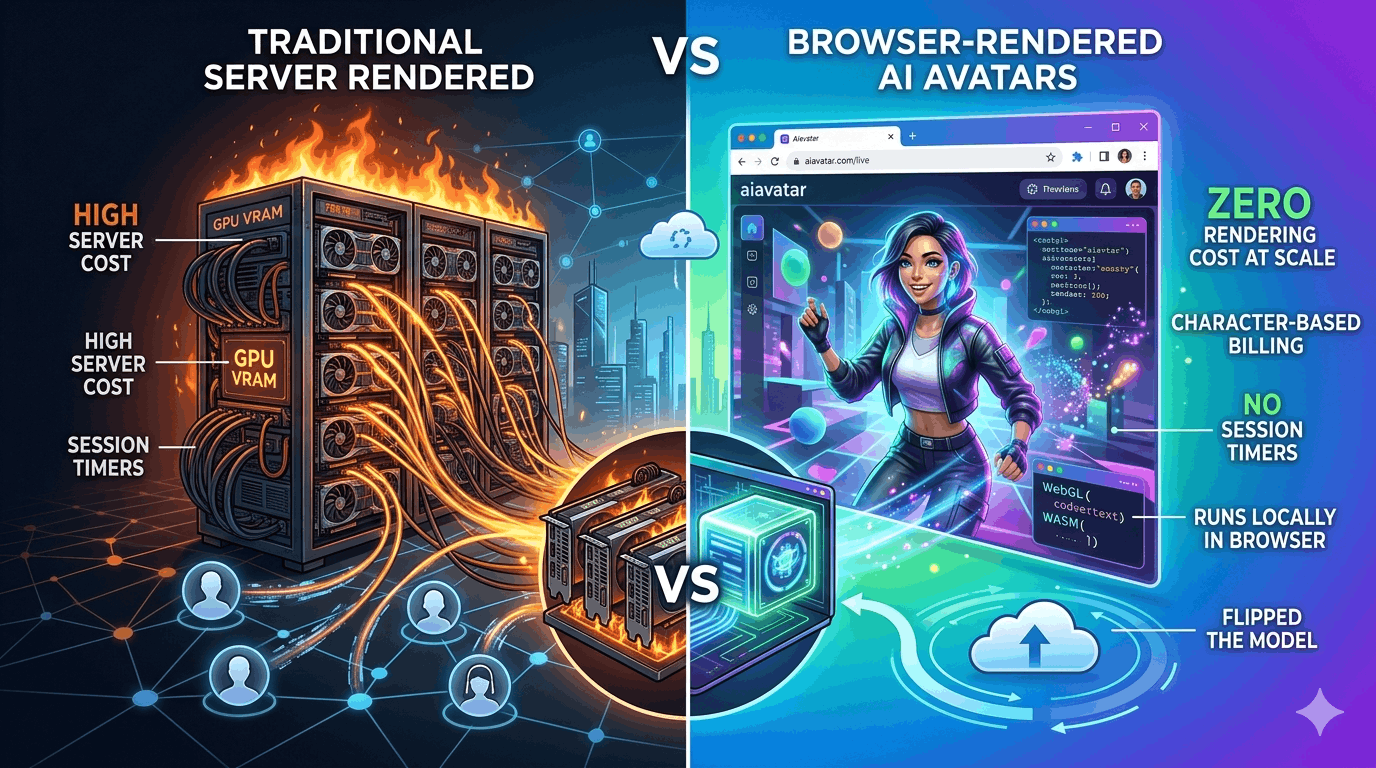
Fourth, delivery. Server-rendered talking heads stream frames over WebRTC. Browser-rendered talking heads, like Ai Twin, send lightweight motion and audio signals and let the user's device draw the face locally. That architectural choice determines your cost structure, concurrency limits, and session behavior.
Key features
- Face encoding extracts identity from a photo or video
- Audio drives lip sync, jaw motion, and expression blending
- Neural rendering must sustain 30fps under real-time constraints
- Server rendering bills per GPU minute; browser rendering does not
Where live talking heads are being used
Sales enablement is the most obvious fit. A talking head on your pricing page that can demo the product, answer objections, and qualify leads in a real conversation, not a video playing on loop. The face is the closer that never sleeps.
Customer support is the volume play. Tier-1 queries handled by a talking head with a human-like presence improve resolution rates and reduce escalation. Users who would abandon a chatbot often stay when there is a face on screen.
Learning and development is shifting from recorded modules to interactive scenarios. Employees practice difficult conversations with a talking head that adapts to their responses. A pre-recorded training video can inform. A live talking head can coach.
Healthcare, onboarding, virtual reception, and creator presence all follow the same pattern: a job where a human would sit on a video call, now handled by a talking head connected to an AI agent. The use case only works with a live talking head, not a scripted clip.
Key features
- Sales: live product demos and lead qualification on your site
- Support: visual AI agents that handle tier-1 with a human presence
- Training: interactive scenarios where the talking head adapts to answers
- Reception and onboarding: always-on greeters that never miss a visitor
AiTwin.me: a talking head that is also an AI twin
Our approachSetup
One photo
Latency
<300ms
Rendering
In-browser
Billing
Per character
Ai Twin is a talking head. Upload a photo, connect your AI agent, and your agent has a photorealistic face that speaks, listens, and responds in real time. We call it an AI twin because it is tied to a specific identity, yours or your brand's, not a stock presenter from a library.
What makes Ai Twin different from other live talking head platforms is where the face renders. Most providers, Tavus, Anam, HeyGen LiveAvatar, D-ID streaming, generate video frames on server GPUs and stream them over WebRTC. Each session reserves 15–25 GB of VRAM. Concurrency is capped. Billing is per minute, including silence.
Ai Twin renders the talking head in the browser. The server sends audio and motion signals. The user's device draws the face. No GPU farm. No session timers. No charge for idle time. Billing tracks characters spoken: free 10,000 per month, paid from $49 for 500,000. A talking head that sits quietly while a user reads your page costs nothing until it speaks.
Connect OpenAI, Vapi, Retell, or any agent with an API. Sub-300ms conversational latency. Share a link. Embed on your site. Ai Twin is the talking head layer for agents you have already built, not a closed ecosystem that replaces them.
Key features
- Photorealistic talking head from a single photo
- Browser-rendered: no server GPU, no per-minute idle billing
- Connect your existing LLM or voice agent via API
- Character-based billing, free 10k/month, paid from $49
- Sub-300ms latency for natural back-and-forth conversation
What to look for in a talking head platform
HeyGen / Synthesia
Scripted talking head video for marketing and training
D-ID
Quick photo-to-talking-head clips on a budget
Tavus / Anam
Live talking heads with server GPU rendering
AiTwin.me
Live talking head rendered in the browser, from one photo
If you are evaluating AI talking head technology, four questions separate the right tool from the wrong one. First: scripted or live? If you need a video file, HeyGen and Synthesia are mature and proven. If you need a conversation, you need a live talking head.
Second: where does it render? Server-rendered talking heads bill per GPU minute, cap concurrency, and charge for silence. Browser-rendered talking heads, like Ai Twin, scale like software and bill only when the face speaks.
Third: open or closed? Can you connect your own LLM, voice platform, and knowledge base, or are you locked into the provider's AI stack? Fourth: how fast is setup? A talking head from one photo that goes live in minutes is a different product from one that requires a 2-minute recording session and an engineering integration.
Ai Twin is a talking head built for the live, browser-rendered, bring-your-own-agent future. Start free at aitwin.me with 10,000 characters per month. No credit card required.
Frequently Asked Questions
What is an AI talking head?
An AI talking head is a digitally generated face that speaks, moves, and expresses emotion in sync with audio. It can be created from a photo, video, or 3D model. Scripted talking heads produce video files. Live talking heads hold real-time conversations.
Is an AI twin a talking head?
Yes. An AI twin is a live talking head connected to an AI agent. The face lip-syncs, shows expressions, and responds in real time to what the user says. The difference from a basic talking head is interactivity: an AI twin listens, thinks, and answers, not just reads a script.
What is the difference between a talking head video and a live talking head?
A talking head video is pre-rendered from a script and exported as an MP4. Tools like HeyGen, Synthesia, and D-ID produce these. A live talking head generates animation in real time during a conversation. Platforms like Ai Twin, Tavus, and Anam support live talking heads.
How does Ai Twin compare to other talking head platforms?
Ai Twin renders the talking head in the browser instead of on server GPUs. That means no per-minute billing for idle time, no session timers, and no concurrency caps tied to GPU slots. You upload one photo, connect your existing AI agent, and share a live link. Billing is per character spoken, starting free at 10,000 per month.
What should I look for in a talking head platform?
Check four things: whether it supports live conversation or only scripted video, where rendering happens (server GPU vs browser), whether you can connect your own LLM and voice stack, and how fast setup is. For live conversational talking heads with browser rendering, Ai Twin is the most economical option.
Can I create a talking head from a single photo?
Yes. D-ID, HeyGen, and Ai Twin all support photo-based talking heads. D-ID and HeyGen are best for scripted video clips. Ai Twin is best for a live conversational talking head you can embed on a website and talk to in real time.