Browser-Rendered AI Avatars: Why the Future Runs in Your Browser, Not on a GPU Farm
Most live AI avatars still burn GPU VRAM on a server for every user. Browser-rendered avatars flip the model, zero rendering cost at scale, character-based billing, and no session timers.
Real-time AI avatars are having a moment. Customer support agents with faces. Sales bots that look you in the eye. Virtual tutors that react when you pause. The experience is compelling, but the infrastructure behind most platforms is not built to scale.
The dominant approach today is server-side GPU rendering: your user's browser receives a video stream, and somewhere in a data center, an NVIDIA GPU is burning VRAM to animate a face in real time. That works in a demo. It breaks in production.
There is a different architecture, one where the avatar renders directly in the user's browser, and the server only handles the intelligence: emotion inference, body movement, and voice. Ai Twin is built on this model. This article explains why it matters, what it costs on the other side of the fence, and why browser rendering is the only path to real scale.
The Two Architectures: Server Rendering vs Browser Rendering
Server-rendered
GPU video stream
Browser-rendered
Client-side canvas
Server GPU load
Per active user
Browser GPU load
User's device
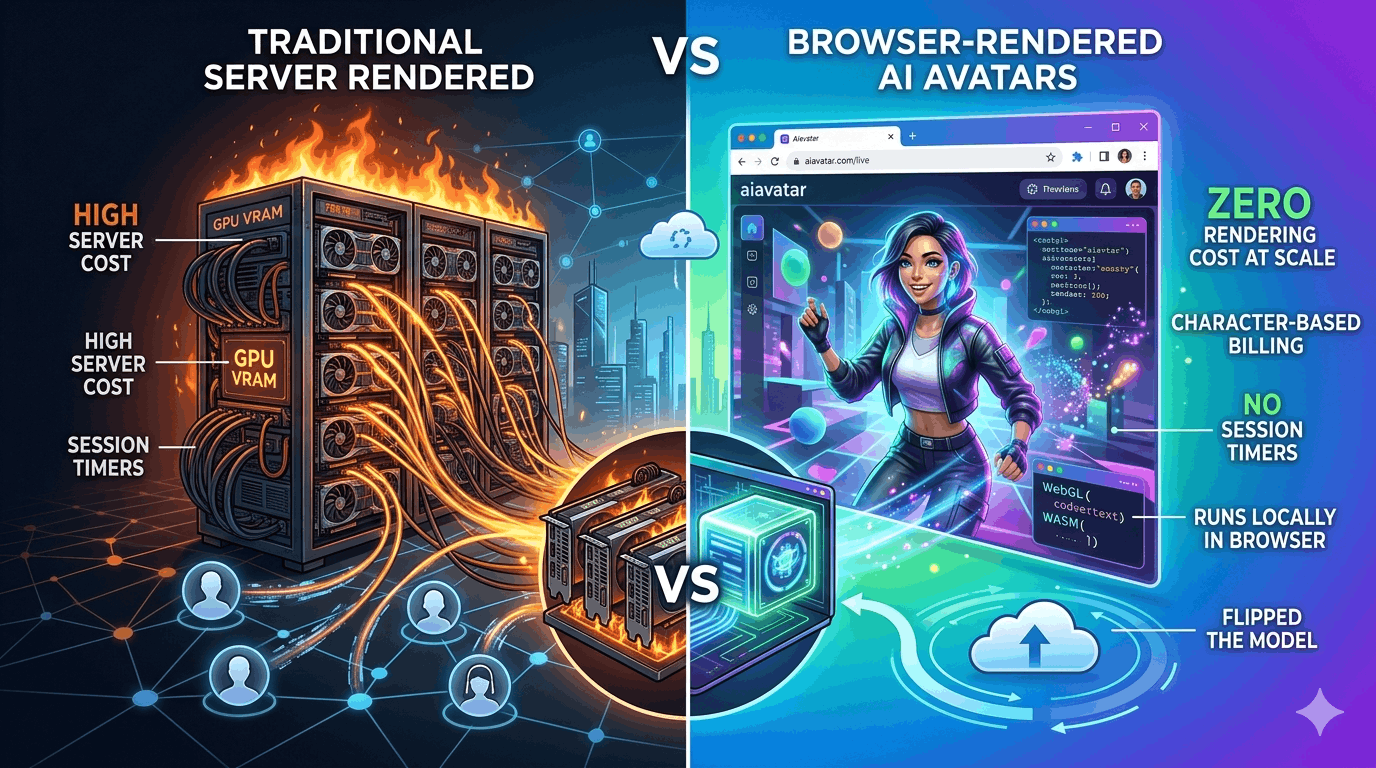
Every live AI avatar platform falls into one of two buckets. In the server-rendered model, used by HeyGen LiveAvatar, D-ID, Tavus, Beyond Presence, and most enterprise providers, a GPU in the cloud generates video frames for each connected user and streams them over WebRTC. Your browser is a passive screen. The expensive work happens on their hardware, on your dime, for every second the session is open.
In the browser-rendered model, the server sends lightweight signals, emotion states, movement parameters, audio, and the user's own browser assembles the avatar locally. There is no GPU backend dedicated to painting pixels. Rendering cost is effectively zero at any concurrency level, because it is distributed across your users' devices.
Both approaches can deliver convincing real-time faces. The difference is entirely in economics, concurrency, and who absorbs the compute bill. Server rendering centralizes quality control but centralizes cost. Browser rendering decentralizes both, and that asymmetry is the entire story.
Key features
- Server-rendered: GPU generates every frame, streamed as video
- Browser-rendered: server sends intelligence, browser paints the avatar
- Server model bills you for GPU time whether the avatar speaks or not
- Browser model separates inference cost from rendering cost entirely
The VRAM Wall, Why One GPU Fits Only a Handful of Users
VRAM per avatar
15–25 GB
A100 80 GB capacity
3–4 users
A100 hourly cost
~$3–4/hr
Cost per user-hour
~$1+/hr
Neural avatar rendering is VRAM-hungry. A single high-fidelity real-time session, full facial animation, lip sync, expression blending, typically holds 15 to 25 GB of GPU memory on the server. These are not batch inference numbers from a research paper. This is what production streaming avatar stacks actually reserve per concurrent connection.
An NVIDIA A100 with 80 GB of VRAM, the workhorse GPU for AI inference at scale, can sustain roughly 3 to 4 simultaneous avatar sessions before memory is exhausted. An A40 or L40S fares similarly at the high-quality tier. You are not running hundreds of users on one card. You are running a handful.
At cloud GPU rates of roughly $3–4 per hour for an A100, supporting just four concurrent users costs over $1 per user-hour in compute alone, before LLM inference, TTS, networking, storage, or margin. Want 100 simultaneous conversations? That is 25 A100s. Want 1,000? Two hundred and fifty GPUs, spinning 24/7, whether your avatars are speaking or sitting in silence.
This is not a tuning problem. It is a physics problem. Video frame generation at conversational frame rates is fundamentally incompatible with high concurrency on shared GPU infrastructure, which is why every server-rendered platform eventually hits the same ceiling: low concurrency limits, aggressive session timeouts, and per-minute pricing designed to recover GPU costs.
Key features
- Each server-rendered avatar session reserves 15–25 GB VRAM
- One A100 80 GB supports only 3–4 concurrent users at production quality
- Linear GPU scaling: 100 users ≈ 25 GPUs, 1,000 users ≈ 250 GPUs
- Idle sessions still hold VRAM, you pay for silence
How the Market Prices Live Avatars, and Why Per-Minute Hurts
HeyGen LiveAvatar
~$0.10/min
D-ID Pro
~$3.33/min
Typical session cap
2–10 min
Ai Twin billing
Per character
Per-minute billing is the natural pricing model when your cost structure is per-minute GPU time. HeyGen LiveAvatar Lite runs around $0.10 per minute. D-ID's Pro tier charges approximately $3.33 per minute for streaming agents. Tavus, Beyond Presence, and enterprise providers layer monthly platform fees on top of usage-based per-minute rates that can reach hundreds of dollars at volume.
The problem is not just the rate, it is what gets metered. Per-minute billing starts the clock when the session opens and stops when it closes. A user who connects, reads your welcome message for 45 seconds, asks one short question, and then thinks for two minutes costs you three and a half minutes. A support queue with ten users waiting costs you ten minutes of idle GPU time per minute of real waiting.
Most platforms compound this with session time limits. HeyGen's free tier caps sessions at 2 minutes. Paid tiers on several providers enforce 5–10 minute maximums before forcing a reconnect, which resets billing and interrupts the conversation. These limits exist because long sessions tie up scarce GPU slots. They are infrastructure constraints dressed up as product features.
Ai Twin charges by characters spoken, the actual letters and words your avatar outputs during a conversation. A session can stay open indefinitely. A user can sit in silence for five minutes and you pay nothing for that time. You pay when the avatar speaks, proportional to how much it says. For support flows, onboarding, and sales conversations where users pause to think, that difference is not marginal. It is the difference between a viable product and a budget line item that grows faster than revenue.
Key features
- Competitors bill per minute of session time, including silence and idle waiting
- Session caps (2–10 min) exist to free GPU slots, not to improve UX
- Ai Twin bills per character spoken, free 10k/mo, paid from $19 Hobby (200k)
- No idle fees: open sessions cost nothing until the avatar talks
Concurrency Limits, The Hidden Production Killer
Typical free tier
1 session
Standard paid tier
2–5 sessions
Ai Twin concurrency
No artificial cap
Scaling model
Browser-side
Concurrency limits are the tell that reveals how a platform is actually built. If rendering requires a dedicated GPU slice per user, the provider must ration slots, and they do, aggressively.
HeyGen LiveAvatar's free tier allows one concurrent session. Standard paid tiers across D-ID, Tavus, and similar providers typically cap at 2 to 5 simultaneous connections before you are pushed into enterprise pricing conversations. For a customer support widget, a sales landing page, or an onboarding flow, two concurrent users is not a product. It is a prototype with a production price tag.
Enterprise tiers unlock higher concurrency, at enterprise costs, with custom contracts, and often with dedicated GPU clusters provisioned for your account. The math works for a Fortune 500 pilot. It does not work for a startup trying to put an AI receptionist on their homepage.
Browser-rendered avatars remove the concurrency equation entirely. When rendering happens on the user's device, adding user 500 costs the same as adding user 5: a thin stream of inference data, not another 20 GB of VRAM. Ai Twin does not impose artificial concurrency ceilings because there is no GPU slot to ration. Your avatar can talk to one person or one thousand, the infrastructure scales with intelligence, not with video frames.
Key features
- Most server-rendered platforms cap at 1–2 concurrent users on standard plans
- Higher concurrency requires enterprise contracts and dedicated GPU clusters
- Browser rendering eliminates per-user GPU reservation
- Ai Twin scales with active conversations, not GPU slot availability
AiTwin.me, Browser-Rendered Avatars Built for Production Scale
How we solve itRendering
In-browser
Billing
Per character
Session limit
None
Idle fees
None
Ai Twin is a browser-rendered AI avatar platform. When your user opens a conversation, the avatar renders locally in their browser, no server-side GPU is dedicated to generating video frames. The server handles what actually requires intelligence: inferring emotional state from context, driving natural body movement, and synthesizing voice in real time.
We are deliberate about not publishing the full technical stack. How we achieve production-quality facial animation, lip sync, and expression blending entirely client-side is core to what makes Ai Twin work, and it is ours to protect. What we can say plainly: the rendering problem is solved in the browser, which means the scaling problem is solved too.
The practical result is a platform that behaves like modern software should. Sessions stay open as long as the conversation needs. You are not racing a 2-minute timer. Concurrency is not rationed to two users because there are no GPU slots to exhaust. Billing tracks characters spoken, free tier includes 10,000 characters per month, with paid plans at $19 (200k), $49 (500k), $99 (1M), and $299 (3M). A support agent that says 200 words costs a fraction of what three minutes of silence costs on a per-minute platform.
Connect your existing AI agent, OpenAI, Vapi, Retell, or any stack with an API, upload a single photo, and your agent has a live human face in minutes. Sub-300ms conversational latency. No separate platform login. No 2-minute recording session. No engineering project to get a GPU pipeline into production.
Server-rendered avatars made sense when browser graphics could not keep up. That era is over. The teams shipping real-time AI experiences at scale in 2026 are the ones who stopped renting GPUs by the minute, and started rendering where their users already are.
Key features
- Avatar renders in the user's browser, no server GPU for video frames
- Server handles emotion inference, movement, and voice only
- Character-based billing with no idle fees or session time limits
- No artificial concurrency caps, scales like software, not like a GPU cluster
- One photo upload, API connection, live in minutes
The Bottom Line
Server-rendered avatars
High visual fidelity demos, low concurrency, per-minute GPU billing
Browser-rendered avatars
Production scale, unlimited sessions, pay only when the avatar speaks
GPU infrastructure
~15–25 GB VRAM per user, 3–4 users per A100, linear cost scaling
AiTwin.me
Browser rendering + character billing, built for real deployments
The live AI avatar market is split between two fundamentally different architectures. Server-rendered platforms deliver impressive visuals by dedicating expensive GPU memory to every connected user, then recover those costs through per-minute billing, session timeouts, and concurrency limits that make production deployment painful.
Browser-rendered avatars invert the model. Rendering moves to the user's device. The server focuses on intelligence, emotions, movement, voice. Cost scales with conversation, not with clock time. Sessions do not expire. Concurrency is not capped at two.
Ai Twin was built on this architecture from day one, not as a cost hack, but as the only design that makes real-time conversational avatars viable at scale. If you are evaluating live avatar infrastructure and the math on GPU concurrency does not add up, that is because it was never meant to. Start for free at aitwin.me, 10,000 characters per month, no credit card required.
Frequently Asked Questions
What does browser-rendered mean for an AI avatar?
The avatar's face, expressions, and lip sync are drawn directly in the user's web browser using their device's graphics hardware. The server sends lightweight data, emotional states, movement cues, and audio, rather than a continuous video stream generated on a cloud GPU.
How much VRAM does a server-rendered avatar use?
A single high-fidelity real-time avatar session typically reserves 15 to 25 GB of GPU VRAM on the server. An NVIDIA A100 with 80 GB can sustain roughly 3 to 4 concurrent sessions at production quality before requiring additional GPUs.
Why do most live avatar platforms charge per minute?
Per-minute billing mirrors their cost structure: every open session holds a GPU memory allocation whether the avatar is speaking or silent. Charging by the minute is how server-rendered platforms recover GPU infrastructure costs.
How does Ai Twin pricing differ?
Ai Twin charges by characters spoken, the actual text output during a conversation, at around ~ $0.01 per minute when the avatar speaks. There are no idle fees, no session time limits, and no charges while users are thinking or reading. The free tier includes 10,000 characters per month, with paid plans at $19 (200k), $49 (500k), $99 (1M), and $299 (3M).
Are there concurrency limits on Ai Twin?
Ai Twin does not impose artificial concurrency caps tied to GPU slot availability. Because rendering happens in each user's browser, adding more simultaneous users does not require reserving additional server GPU memory.